
Table of Contents
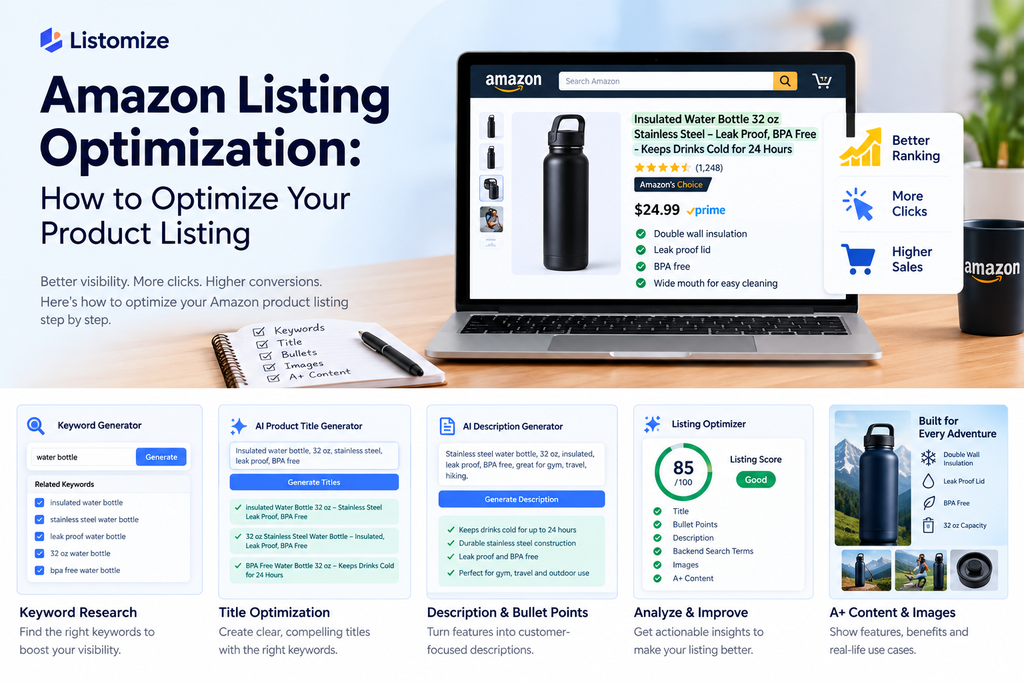
Selling on Amazon is not just about having a great product. Your product listing also needs to help shoppers find the product, understand what it offers, and feel confident buying it.
That’s where Amazon listing optimization comes in. By improving elements such as your product title, bullet points, description, keywords, images, and other listing details, you can make your product page more useful to both shoppers and search engines.
But optimization isn’t about stuffing keywords into every part of your listing. The goal is to use relevant search terms naturally while presenting your product information clearly and persuasively.
In this guide, you’ll learn how Amazon listing optimization works and how to optimize each major part of your product listing.
What Is Amazon Listing Optimization?
Amazon listing optimization is the process of improving your product page so that it is easier for relevant shoppers to discover, understand, and purchase your product.
An Amazon listing typically includes several important elements, including:
- Product title
- Bullet points
- Product description
- Search terms
- Product images
- A+ Content
- Categories and attributes
- Variations
- Reviews and other customer feedback
Each element has a different purpose. Your title and keywords can help communicate what the product is, while your images, bullet points, and description give shoppers the information they need to evaluate it. [Amazon product listing requirements]
Amazon Product Listing vs. Listing Optimization
An Amazon product listing is the actual product page customers see when they shop on Amazon.
Listing optimization is the process of improving that page.
For example, suppose you sell a stainless steel water bottle. A basic listing might have a vague title, generic bullet points, and a few product photos. An optimized listing would clearly communicate details such as the bottle’s capacity, material, insulation, intended use, and key benefits while naturally incorporating relevant search terms.
SEO vs. Conversion Optimization
Amazon listing optimization involves two closely connected goals: visibility and conversion.
SEO-focused optimization helps make your product information relevant to the searches shoppers perform. This includes researching relevant keywords and using them naturally in appropriate parts of the listing.
Conversion-focused optimization helps shoppers understand the product and decide whether it meets their needs. Clear benefits, useful images, accurate information, and easy-to-scan copy all contribute to this experience.
Focusing on only one side can leave gaps. A listing may attract relevant shoppers but fail to convince them to buy, or it may have strong sales copy but struggle to reach the right audience.
What Does an Optimized Amazon Listing Include?
A well-optimized listing brings several elements together:
- Relevant keywords that match how shoppers search
- A clear product title that quickly explains what you’re selling
- Useful bullet points that highlight important features and benefits
- A helpful product description that provides additional context
- Relevant backend search terms where appropriate
- High-quality product images that show the product clearly
- A+ Content when available and useful
- Accurate categories and attributes
- Relevant variations when a product has different sizes, colors, or options
- Customer feedback that can reveal questions or areas where the listing could be clearer
The key is to make all of these elements work together rather than treating each one as a separate SEO task.
Why Is Amazon Listing Optimization Important?
Amazon shoppers often have many products to choose from, so your listing needs to communicate the right information quickly. A well-optimized listing can make it easier for relevant shoppers to discover your product and understand why it may be a good fit for their needs.
Improve Product Visibility
When shoppers search on Amazon, they use specific words and phrases to describe what they want. Using relevant search terms naturally throughout your listing helps make your product information more closely aligned with those searches.
Keyword research is therefore an important part of listing optimization. Instead of targeting every possible keyword, focus on terms that are genuinely relevant to your product and the way your customers search. [Amazon’s search and listing guidance]
Attract More Relevant Shoppers
Getting traffic to your listing is only useful when the visitors are interested in what you sell.
For example, if you sell a 32-ounce insulated water bottle, your listing should clearly communicate details such as its size, material, insulation, and intended use. This helps shoppers quickly determine whether the product matches what they’re looking for.
Relevant keywords combined with accurate product information can help set the right expectations before a shopper reaches the buying decision.
Improve Click-Through and Conversions
Visibility is only one part of the equation. Once shoppers reach your listing, the content needs to give them enough information to evaluate the product.
A clear title, benefit-focused bullet points, strong images, and a useful description can make the product easier to understand. When shoppers can quickly find answers to their questions, they have more information available when deciding whether to purchase.
Create a Better Shopping Experience
Listing optimization isn’t only about search engines. It’s also about making the product page easier for people to use.
Shoppers should be able to quickly understand:
- What the product is
- What it does
- Who it’s for
- What makes it different
- What size, quantity, or variation they’re getting
- How the product looks and can be used
When these details are presented clearly, shoppers don’t have to work as hard to understand the product.
The goal of Amazon listing optimization is therefore broader than simply adding keywords. A strong listing connects relevant search terms with clear, accurate, and useful product information—helping shoppers move from finding a product to understanding it and making an informed purchase.
How to Optimize an Amazon Listing
Optimizing an Amazon listing works best when you look at the entire product page rather than focusing on one element. Start with relevant keywords, then use them naturally while improving the information shoppers see throughout the listing.
1. Start With Amazon Keyword Research
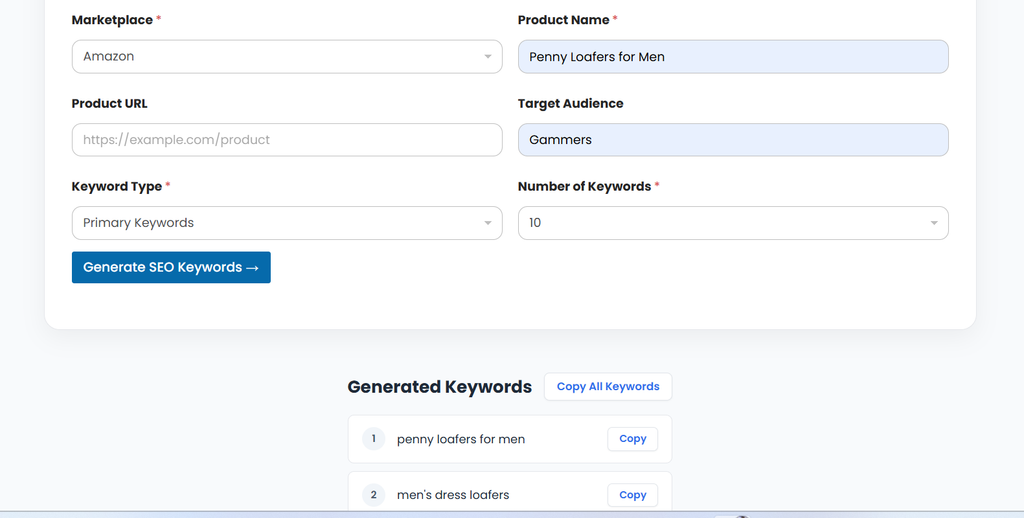
Before rewriting your listing, identify the words and phrases potential customers actually use when searching for products like yours.
Start by building a list of relevant search terms. Amazon’s search suggestions can provide useful ideas because they reflect common searches on the platform. You can also analyze competing listings and use keyword research tools to find related terms and long-tail variations.
For example, if you sell an insulated water bottle, potential keywords could include:
- insulated water bottle
- stainless steel water bottle
- reusable water bottle
- insulated water bottle for hiking
- 32 oz insulated water bottle
Don’t try to use every keyword you find. Focus on terms that accurately describe your product and match the search intent of your target customer.
Once you’ve collected your keywords, organize them by relevance and consider where they can naturally fit within your listing.
Tip: A keyword should make sense in the context of the sentence. Adding keywords repeatedly just to increase their frequency can make your listing harder to read. [Amazon search terms guidance]
2. Optimize Your Amazon Product Title
Your product title is one of the first things shoppers see, so it should communicate the most important information quickly.
A useful title typically makes clear:
- What the product is
- The brand, when relevant
- Important features
- Size, quantity, color, or other key details
- The primary search term, when it fits naturally
For example, instead of:
Premium Bottle – Great Quality – Buy Now
A more informative title could be:
Stainless Steel Insulated Water Bottle, 32 oz, Leakproof Reusable Bottle for Hiking and Travel
The second version gives shoppers a much clearer idea of what the product is and who it may be suitable for.
Keep readability in mind when optimizing your title. Don’t repeat the same keyword several times or add unnecessary promotional language just to make the title longer.
Want to speed up the process? An AI product title generator can help you create and compare different title variations before choosing the one that best represents your product. [Amazon’s product title requirements]
3. Write Better Amazon Bullet Points
After your title, bullet points are one of the most important places to explain what your product offers. Shoppers often scan these points before deciding whether to read further, so each one should communicate a useful piece of information.
Instead of simply listing features, connect those features to benefits that matter to the customer.
For example:
Weak:
Double-wall stainless steel construction.
Better:
Double-Wall Insulation: Helps keep drinks cold for hours, making the bottle convenient for work, travel, or outdoor activities.
When writing your bullet points:
- Lead with the most important product benefits.
- Explain features in a way customers can easily understand.
- Keep the wording clear and easy to scan.
- Address common questions or concerns about the product.
- Use relevant keywords naturally where they fit.
- Avoid repeating the same information across multiple bullets.
- Don’t make claims that the product cannot support.
Think of each bullet as an opportunity to answer a question a potential buyer might have. For example, instead of simply saying a product is “lightweight,” explain why that matters to the customer.
A strong set of bullet points should help shoppers understand what the product does, why its features matter, and how it fits their needs without making them read a wall of text.
4. Optimize Your Amazon Product Description
Your product description gives you more space to explain the product and provide information that may not fit naturally into the title or bullet points.
A good description should focus on what the customer needs to know rather than simply repeating the same features from your bullets.
For example, if you’re selling an insulated water bottle, don’t just say:
“This bottle is made from stainless steel and has double-wall insulation.”
Instead, explain the practical value:
“Made with stainless steel and double-wall insulation, this bottle is designed to help keep your drinks at the desired temperature while you’re commuting, working, or spending time outdoors.”
When optimizing your product description:
- Explain important product features and their benefits.
- Use relevant keywords naturally.
- Address common customer questions.
- Highlight details that help differentiate the product.
- Keep paragraphs short and easy to read.
- Avoid unnecessary repetition.
- Write for the customer first rather than trying to fill the description with keywords.
Your description should also match the information presented elsewhere on the listing. If the title, bullets, images, and description provide conflicting information, shoppers may become uncertain about the product.
For sellers using A+ Content, the product description is also part of a broader product-page experience. Use each section of the listing for a clear purpose instead of repeating the same message everywhere.
Tip: AI writing tools can help create a first draft or suggest alternative wording, but always review the output to make sure product details, claims, and specifications are accurate.
5. Use Backend Search Terms Strategically
Backend search terms give you another place to provide relevant search information without making your visible listing copy difficult to read.
These terms can be useful for relevant phrases that don’t naturally fit into your title, bullet points, or description. The goal is to give Amazon additional context about your product while keeping your customer-facing content natural.
When working with backend search terms:
- Focus on keywords that are genuinely relevant to the product.
- Consider synonyms and alternative phrases shoppers may use.
- Avoid repeating terms unnecessarily.
- Don’t add unrelated keywords just because they have high search volume.
- Avoid turning your backend fields into a list of random keyword variations.
- Keep your visible listing copy useful and readable instead of forcing every keyword into it.
For example, a seller offering a stainless steel insulated water bottle might research related phrases such as “reusable drink bottle,” “thermal water bottle,” or “sports water bottle.” Whether a particular term belongs in the backend depends on its relevance to the actual product and how it is already represented elsewhere.
Backend search terms should support your overall keyword strategy, not replace good listing content. Your title, bullets, description, and other visible elements still need to clearly communicate the product to shoppers. For a deeper look at hidden search terms and how to use them effectively, see our guide to Amazon backend keywords
6. Optimize Your Product Images
Product images play a major role in helping shoppers understand what they’re buying. Since customers can’t physically examine the product before purchasing, your images need to provide as much useful visual information as possible.
Start with a clear main image that makes the product easy to recognize. Then use additional images to show important details, different angles, size, features, and the product in use.
For example, a listing for an insulated water bottle could include:
- A clear main product image
- Different views of the bottle
- A close-up showing the lid or insulation features
- A size or capacity comparison
- A lifestyle image showing the bottle being used
- An infographic explaining important features
When optimizing your images:
- Use clear, high-quality product photography.
- Make the product easy to see.
- Show important features from useful angles.
- Use lifestyle images when they help explain the product.
- Add simple infographics where they provide useful information.
- Make sure visual claims match the actual product.
- Follow Amazon’s current image requirements for the relevant product category.
Don’t treat images as decoration. Each image should answer a question or remove a potential doubt a shopper may have.
A strong image set can help customers understand the product faster and make the listing easier to evaluate—especially when important features are difficult to explain with text alone. [Amazon’s image requirements]
7. Improve Your A+ Content
A+ Content gives eligible sellers an opportunity to provide additional information and visual context on the product detail page. Instead of relying only on standard text, you can use richer layouts to explain your product and its benefits.
Use A+ Content to answer questions that shoppers may still have after reading the title, bullets, and description.
Useful elements can include:
- Product features and benefits
- Lifestyle images
- Product comparisons
- Brand or product information
- Visual explanations of how the product works
- Comparison tables for related products
For example, if you’re selling kitchen equipment, your A+ Content could show the product in use, explain its main features visually, and compare different models or sizes.
The key is to add useful information rather than repeat your existing listing copy. If a shopper already understands a feature from your bullet points, use the additional space to provide context, demonstrate the feature, or answer a related question.
Keep the design easy to scan and make sure all information is accurate and consistent with the rest of the listing. A+ Content should support the buying decision rather than distract from it. [Amazon A+ Content]
8. Optimize Categories, Attributes & Variations
Choosing the right category and providing accurate product information can make your listing easier for shoppers to understand and navigate.
Start by making sure your product is placed in the most relevant Amazon category. Then complete the applicable attributes, such as size, color, material, style, or other product-specific details.
If your product comes in multiple options, use variations appropriately. For example, a water bottle might be available in different sizes or colors. Keeping these options organized can make it easier for shoppers to compare and select the version they want.
When optimizing categories and attributes:
- Choose the category that accurately represents the product.
- Complete relevant attributes with accurate information.
- Keep product specifications consistent across the listing.
- Use variations only when the products genuinely belong together.
- Make size, color, quantity, and other options clear.
- Avoid adding inaccurate attributes simply to target additional searches.
Accurate product data also helps prevent confusion. If the title says a bottle holds 32 ounces but another part of the listing says 24 ounces, shoppers may hesitate to purchase.
Think of categories and attributes as supporting information that helps Amazon and shoppers better understand exactly what you’re selling.
9. Review Your Pricing and Competitive Position
Pricing can influence how shoppers evaluate your product alongside competing offers. Listing optimization should therefore include a review of how your price fits within the market.
Before making changes, compare your product with similar products and consider what shoppers are getting at each price point.
Look at:
- Prices of relevant competitors
- Product features and specifications
- Pack size or quantity
- Product quality and positioning
- Promotions or discounts
- Whether your listing clearly communicates the value behind the price
Avoid automatically trying to be the cheapest option. If your product costs more than similar products, your listing should make its differences clear so shoppers can understand the value.
Pricing should also be reviewed periodically because competitors, promotions, and market conditions can change.
10. Use Reviews and Customer Feedback
Customer reviews can provide useful insights into how shoppers experience your product after purchase. They can also reveal questions or concerns that your listing could address more clearly.
Look for recurring themes such as:
- Confusion about product size or specifications
- Questions about how the product works
- Features customers appreciate
- Common complaints or misunderstandings
- Information shoppers expected but couldn’t find
For example, if customers repeatedly mention that a product is smaller than they expected, the listing could make its dimensions more prominent and include a useful size comparison image.
Use feedback to improve the accuracy and clarity of your listing rather than trying to manipulate reviews or customer sentiment.
The goal is simple: if real customer feedback shows that shoppers are confused about something, improve the listing so future shoppers can understand the product more easily.
How AI Can Help With Amazon Listing Optimization
AI can speed up many of the repetitive tasks involved in creating and improving Amazon listings. It can help sellers generate ideas, analyze existing copy, and identify areas that may need improvement.
The important part is to use AI as a starting point and optimization assistant, not as a replacement for product knowledge or human review.
Generate Product Title Ideas
AI can create multiple title variations based on your product details and target keywords.
For example, instead of manually rewriting the same title several times, you can provide the product specifications and ask AI to generate different versions. You can then review them for accuracy, readability, and relevance before choosing the most suitable version.
Create Product Descriptions
AI can help turn product features into clearer, customer-focused descriptions.
You can provide information such as materials, dimensions, features, use cases, and target customers, then use AI to create a first draft. The final copy should always be reviewed to remove inaccurate claims or information that isn’t supported by the actual product.
Find Relevant Keywords
AI can help brainstorm related search terms, synonyms, and long-tail keyword ideas based on a product.
However, generated keyword ideas should be validated before using them. Not every phrase suggested by AI will have meaningful search demand or be relevant to the product.
Identify Listing Optimization Opportunities
AI can also be useful for reviewing an existing listing and identifying potential improvements.
For example, it can help flag:
- Missing product information
- Repetitive wording
- Unclear benefits
- Weak or generic bullet points
- Potential keyword gaps
- Sections that could be easier to read
This can give sellers a starting point for improving the listing instead of manually reviewing every element from scratch.
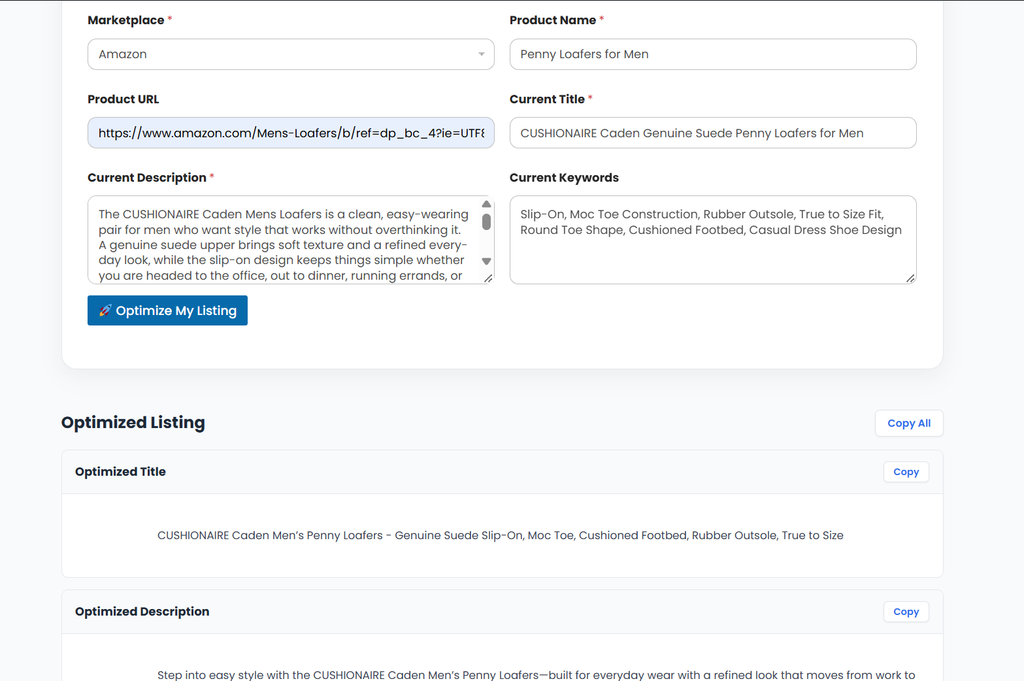
Score and Improve an Existing Listing
AI can also help evaluate an existing Amazon listing and turn the review into specific improvement ideas.
For example, you can provide your current title, bullet points, description, and product details and ask AI to identify:
- Missing or unclear information
- Repetitive wording
- Weak product benefits
- Keyword placement opportunities
- Areas that may be difficult to scan
- Potential differences between your listing and competitors
A listing score or optimization report can make this process easier by giving sellers a structured way to review different parts of their product page.
However, an AI-generated score should be treated as a diagnostic tool rather than a guarantee of rankings or sales. Always verify recommendations against the actual product, Amazon’s requirements, and your performance data.
Tools such as Listomize can combine these AI-assisted tasks into a single workflow, helping sellers research keywords, generate listing content, and review existing listings more efficiently.
Amazon Listing Optimization Checklist
Before publishing or updating your listing, use this quick checklist:
- ☐ Relevant keywords researched
- ☐ Primary keyword used naturally in the title
- ☐ Title clearly describes the product
- ☐ Bullet points highlight important features and benefits
- ☐ Description provides useful additional information
- ☐ Backend search terms are relevant
- ☐ Product images clearly show the product
- ☐ A+ Content is useful and accurate, where available
- ☐ Category and attributes are accurate
- ☐ Variations are organized correctly
- ☐ Pricing has been reviewed against relevant competitors
- ☐ Customer feedback has been considered
- ☐ Listing information is consistent across all sections
- ☐ Content has been reviewed for accuracy and readability
How Often Should You Optimize Your Amazon Listing?
Amazon listing optimization isn’t something you need to do once and forget. Your listing should be reviewed whenever you have a clear reason to improve it.
Consider reviewing your listing when:
- Your product’s search visibility changes.
- You discover new, relevant keyword opportunities.
- Competitors change their positioning or product offerings.
- Customer reviews reveal repeated questions or concerns.
- Your product specifications, packaging, or features change.
- Your traffic or conversion performance shows an area that needs attention.
You don’t need to rewrite your entire listing every time you find a new keyword. Instead, make changes based on a specific opportunity or problem and monitor how the listing performs afterward.
Regular reviews can help keep your product information accurate, relevant, and aligned with what shoppers are looking for.
Frequently Asked Questions
What is Amazon listing optimization?
Amazon listing optimization is the process of improving a product listing’s content and information to make it easier for relevant shoppers to find, understand, and evaluate the product. This can include the title, bullet points, description, keywords, images, A+ Content, attributes, and other listing elements.
How do I optimize my Amazon listing?
Start with relevant keyword research, then improve your title, bullet points, description, images, backend search terms, and other applicable listing elements. Focus on accuracy, readability, relevance, and the needs of your target customers rather than simply adding more keywords.
What are the most important parts of an Amazon listing?
Important elements include the product title, bullet points, product description, images, relevant search terms, categories and attributes, and A+ Content where available. The relative importance of each element can vary depending on the product and listing.
How do I optimize an Amazon product title?
Create a clear title that identifies the product and includes important details such as the brand, product type, key features, size, or quantity where relevant. Use relevant keywords naturally and avoid unnecessary repetition.
Can AI help optimize Amazon listings?
Yes. AI can help with tasks such as generating title ideas, creating description drafts, brainstorming keyword ideas, reviewing listing copy, and identifying potential improvements. AI output should still be checked for accuracy, relevance, and compliance before publishing.
Should I use the same keyword throughout my Amazon listing?
Not necessarily. Use relevant keywords where they fit naturally and accurately. Repeating the same keyword unnecessarily can make your content less readable. A broader set of relevant terms can often communicate the product more naturally.
Conclusion
Amazon listing optimization is more than adding keywords to a product page. A strong listing helps the right shoppers find your product, understand its value, and get the information they need to make a confident purchase.
Start with relevant keyword research, then optimize your title, bullet points, description, images, backend search terms, and other applicable listing elements. Keep the content clear, accurate, and focused on the customer instead of trying to force as many keywords as possible into the page.
It’s also worth reviewing your listing regularly. Search behavior, competitors, customer feedback, and product information can change over time, giving you new opportunities to improve.
If you want to speed up the process, AI-powered tools like Listomize can help with keyword research, product titles, descriptions, and listing optimization—so you can spend less time creating listing content and more time growing your store.